Eye strain is a temporary cluster of eye and neck symptoms, including dry or burning eyes, blurred vision, headaches, and sometimes neck or shoulder pain, that shows up most often after prolonged near work or digital screen use. The main triggers are screen time, uncorrected refractive error, unstable tear film, and poor lighting or posture. None of it signals permanent damage, but ignoring the pattern can mean missing a prescription change or a dry eye problem that needs actual treatment.
TL;DR:
- Reduced blink rate during sustained screen use leads to tear film breakup, causing dry, itchy, and gritty sensations that worsen with prolonged focus.
- Poor ergonomic setup, such as screens too close or poorly positioned, significantly increases accommodative strain and musculoskeletal discomfort.
- Symptoms improving within 20 to 30 minutes after stopping near work indicate strain rather than a structural eye condition, while constant symptoms suggest underlying issues.
- Eye exams should verify current prescriptions, assess tear film health, and evaluate binocular alignment, especially if symptoms persist or worsen.
- Short, frequent breaks following the 20-20-20 rule, proper ocular surface care, and ergonomic adjustments can effectively reduce eye strain symptoms within days.
Table of Contents
- What Are the Symptoms of Eye Strain?
- What Causes Eye Discomfort and Strain?
- How Do You Know If It’s Eye Strain?
- How to Relieve Eye Strain and Prevent It From Coming Back
- What Does the Research Actually Say?
- A Real-World Fix: The Office Worker Scenario
- Where Nutritional Support Fits Into Eye Health
- Sources
- FAQ
What Are the Symptoms of Eye Strain?
Eye strain rarely shows up as one clean symptom. It’s usually a mix, and the combination often tells you more than any single sensation does.
The most frequently reported symptoms, according to the Mayo Clinic, include:
- Sore, tired, burning, or itching eyes
- Watery or unusually dry eyes
- Blurred or double vision
- Increased sensitivity to light (photophobia)
- Difficulty concentrating
- Headaches, often behind or between the eyes
- Neck, shoulder, or back discomfort
There’s a meaningful difference between blur that clears within a few minutes of looking away from a screen and blur that lingers or gets worse across the day. Task-specific blur that resolves with rest points toward strain. Persistent blur, especially if it’s new, deserves an exam rather than another round of breaks.
Timing matters too. Symptoms tend to build gradually during long stretches of reading, driving, or screen work, then ease once the task stops. If your eyes feel fine at 9 a.m. and rough by 3 p.m. after six straight hours at a monitor, that arc is classic screen fatigue eye symptoms, not something structural.
The neck and shoulder piece surprises people, but it’s mechanical. When your eyes strain to focus, your head often drifts forward to compensate, and that forward posture loads the muscles at the base of the skull and across the shoulders. Eye and musculoskeletal symptoms frequently arrive together because they share the same root cause.

What Causes Eye Discomfort and Strain?
Four separate mechanisms drive most cases, and they often overlap.
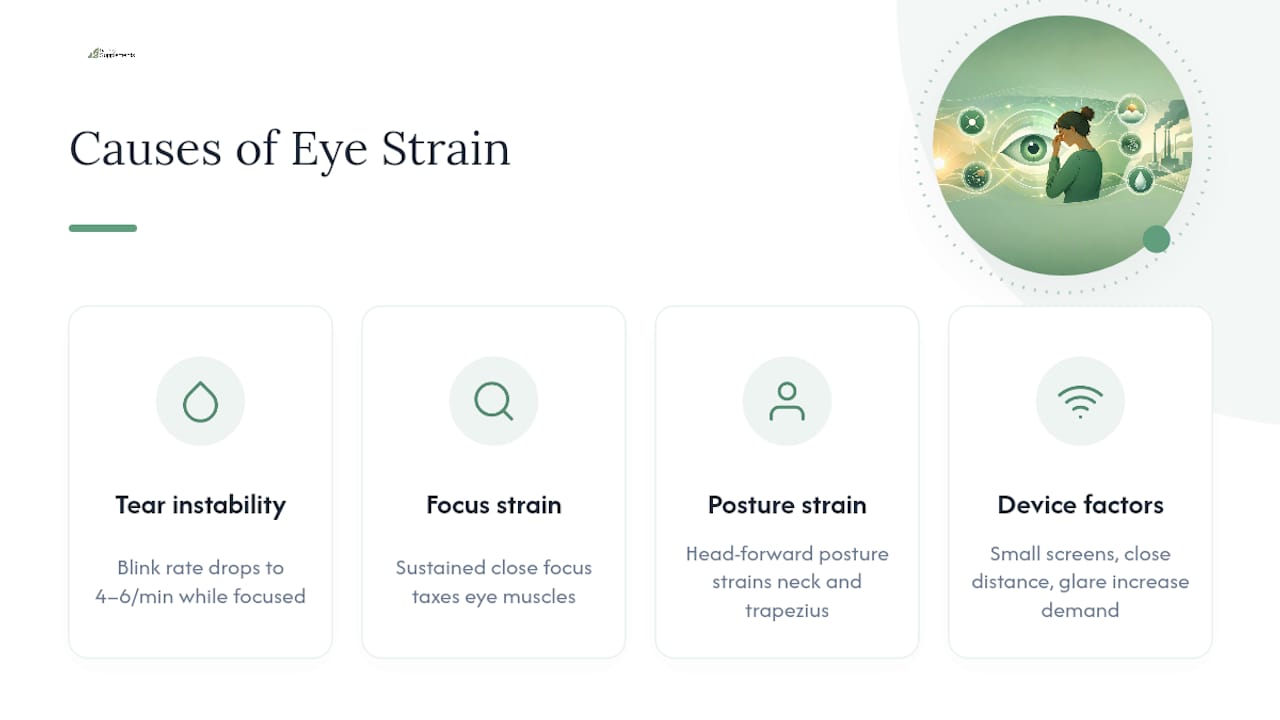
Ocular surface instability. Normal blink rate runs around 14 to 16 times per minute. During concentrated screen work, that rate can drop to as low as 4 to 6 times per minute, according to a comprehensive review in PMC. Fewer blinks means the tear film breaks up faster across the cornea, and that’s what produces the classic dry, burning, gritty feeling.
Accommodative and vergence strain. Sustained close focus taxes the eye muscles that adjust lens shape and eye alignment. Add uncorrected refractive error or early presbyopia, and the visual system works harder just to keep an image sharp, sometimes producing double vision under fatigue.
Posture and musculoskeletal strain. Poor screen positioning encourages the head-forward posture mentioned above, straining the trapezius and neck extensors.
Device and environment factors. Screen size, viewing distance, glare, and refresh rate all shift how hard the visual system has to work. Smaller screens and closer viewing distances make the accommodative demand worse, and glare forces more squinting and blinking effort.
Risk climbs with exposure. People who spend two or more continuous hours on a digital device face a measurably higher risk of computer-related eye strain, per the American Optometric Association. Cognitive load compounds the problem: the harder a task demands concentration, the earlier blink rate drops and symptoms start.
Pro Tip: Notice whether your eyes feel worse during focused, high-stakes tasks (spreadsheets, detailed edits) versus passive scrolling. Concentration itself suppresses blinking, independent of screen time.
How Do You Know If It’s Eye Strain?
A few quick questions narrow it down fast.
- Does it improve with rest? Symptoms that fade within 20 to 30 minutes after stopping the task point toward strain rather than a structural eye problem.
- Is it task-specific? Strain tends to show up during near work or screen use and stays quiet otherwise. Constant symptoms regardless of activity suggest something else, like dry eye disease or an uncorrected prescription.
- Is it one eye or both? Double vision in one eye only (it persists even with the other eye closed) is a different issue than binocular double vision, and it changes what a clinician looks for.
An eye exam for these complaints typically checks refraction (whether your prescription is current), binocular vision and alignment, tear film quality and ocular surface health, and sometimes posture and working distance. Eye strain is often a symptom rather than an independent disease, which is why the American Academy of Ophthalmology recommends describing your exact sensations, including timing, during an exam rather than just saying “my eyes hurt.”
Certain signs bypass the self-check entirely. Sudden vision loss, severe eye pain, new flashes or floaters, or double vision that doesn’t resolve with rest all need prompt medical attention, not a break from your screen.
How to Relieve Eye Strain and Prevent It From Coming Back
Most fixes work faster than people expect, and they layer on top of each other.
Break strategy. The 20-20-20 rule (every 20 minutes, look at something 20 feet away for 20 seconds) is the standard recommendation, and frequent short breaks outperform one long break at the end of the day. Micro-breaks reset accommodative effort before fatigue builds.

Blink and ocular surface care. Consciously blinking fully, using artificial tears when eyes feel dry, running a humidifier, and keeping air vents away from direct eye exposure all address the tear-film side of the problem. Harvard Health lists these among the most practical, evidence-supported measures available.
Ergonomics. Position screens 20 to 26 inches away, slightly below eye level, reduce glare from windows or overhead lights, and adjust brightness and contrast so the screen isn’t fighting the room’s ambient light. Larger displays reduce the accommodative demand compared to squinting at a small laptop or phone screen.
Optical correction. If refraction or presbyopia is contributing, standard bifocals often aren’t tuned for the intermediate distance of a monitor, and clinicians commonly recommend computer-specific lenses calibrated for that range, according to the Cleveland Clinic.
- Blue-light blocking lenses have limited evidence behind them for reducing eye strain specifically
- Nutritional supplements support long-term retinal and tear-film health, but they’re adjunctive, not a same-day fix
Pro Tip: If you wear reading glasses and still feel strain at your desk, the prescription may be tuned for book distance (14 to 16 inches), not monitor distance. That mismatch alone causes a lot of unnecessary discomfort.
For readers curious about ingredient-level detail on the supplement side, RankOfSupplements has reviewed the evidence on vitamins for dry eyes and computer eye strain.
What Does the Research Actually Say?
Digital eye strain isn’t caused by one bad habit. It’s a convergence of blink suppression, accommodative load, posture, and environment, and the interventions with the strongest support target those mechanisms directly rather than promising a single fix.
Clinicians and researchers use validated tools like the Computer Vision Syndrome Questionnaire (CVS‑Q) to quantify symptom severity in occupational settings, though these scales tend to capture peripheral ocular symptoms better than central fatigue or concentration difficulty. That’s a real gap. It means two people can score similarly on a symptom questionnaire while one is dealing with dry eye and the other with an outdated prescription. Evidence for blue-light filtering as a strain reducer remains weak, which is worth knowing before spending money on that fix specifically.
A Real-World Fix: The Office Worker Scenario
Picture someone who spends eight hours a day between two monitors, notices end-of-day headaches, and blames the screens outright. The fix usually isn’t one thing. Adjusting monitor height and distance often helps within days, adding artificial tears addresses the dryness piece, and an actual eye exam frequently turns up a prescription that’s a year or two out of date, especially for anyone over 40 heading toward presbyopia.
Working distance matters as much as the prescription itself. Once the ergonomics and tear-film issues are handled, some people look at supplements like lutein and zeaxanthin for longer-term retinal support, not as a substitute for the exam. For broader lifestyle steps that complement this approach, RankOfSupplements’ guide on improving eyesight naturally covers the non-screen side of eye health.
— matteo
Where Nutritional Support Fits Into Eye Health
Supplements won’t undo a day of squinting at a spreadsheet, and no ingredient replaces a correct prescription or a humidifier in a dry office. What lutein, zeaxanthin, and omega-3s can plausibly support is the longer arc: retinal pigment density and tear-film composition over months, not minutes.
That’s a different job than the 20-20-20 rule, and it’s worth being honest about which problem each tool solves. If you want the ingredient-level breakdown, including dosages and the evidence behind them, RankOfSupplements has put together a ranked review of eye-health supplements covering the formulas most commonly recommended for screen-heavy lifestyles. For a deeper dive into specific compounds and how much research backs each one, the ingredient library breaks down the evidence strand by strand. If your ergonomics and exam are already sorted and you’re looking at what else might help over the next year, that review is the next step to check.
Sources
- Eyestrain - Symptoms and causes (Mayo Clinic)
- Digital Eye Strain- A Comprehensive Review (PMC)
- Computer vision syndrome | American Optometric Association (AOA)
- What is eye strain? (American Academy of Ophthalmology, AAO)
- Effective tips for reducing eye strain (Harvard Health)
This article is general information, not a substitute for advice from a qualified doctor. Consult a qualified healthcare professional about your own circumstances before acting on anything here.
FAQ
What Is the Main Cause of Eye Strain?
Prolonged near work and digital screen use are the leading causes, driven mainly by reduced blink rate and sustained accommodative effort. Uncorrected refractive error and poor lighting or posture frequently compound the problem.
What Can Be Mistaken for Eye Strain?
Dry eye disease, uncorrected refractive error, and even tension headaches can produce symptoms similar to eye strain, which is why the AAO recommends a proper exam rather than self-diagnosis when symptoms persist.
How Do I Know If It’s Eye Strain?
Check whether symptoms ease within 20 to 30 minutes of rest and whether they only appear during near work or screen time. If symptoms are constant regardless of activity, or vision changes suddenly, see an eye care professional.
What Helps Eye Strain Go Away?
The 20-20-20 rule, conscious blinking, artificial tears, and proper screen distance and height typically bring relief within days. If symptoms persist despite these changes, an updated prescription or a dry eye evaluation is usually the next step.